
AI on your server
AI is off by default in every image. For what users can do with AI, see AI assistant.
Choose where AI runs#
- Sign in as an administrator and open Settings → Server → AI Engine.
- Under Connection, choose an option.
- Select Save Changes, then Restart Now. For your own engine on
latest-fat, restart the container instead, because Restart Now does not start the bundled engine.
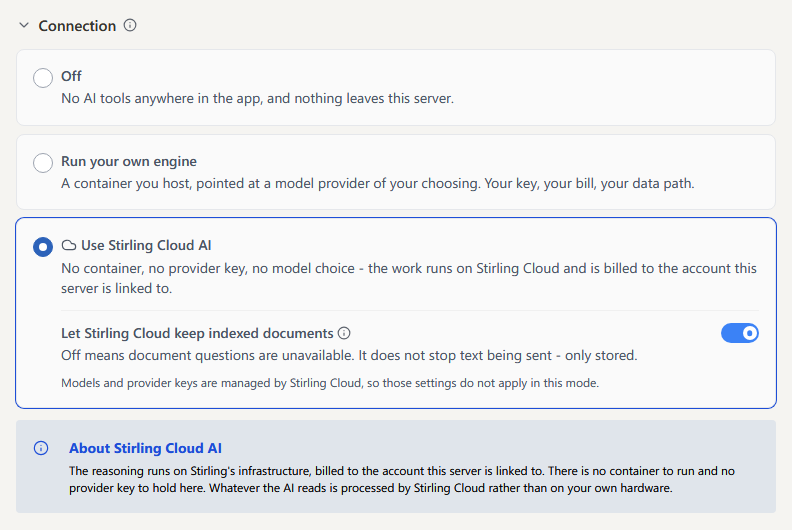
| Option | What it means | Set it up |
|---|---|---|
| Off | No AI tools anywhere in the app, and nothing leaves this server. | Default |
| Run your own engine | An AI engine you host, using a model provider you choose, such as Claude, GPT or a local model. You hold the keys and pay the provider. | Run the AI engine |
| Use Stirling Cloud AI | No engine, provider key or model choice. AI runs on Stirling Cloud and is billed to the Stirling account this server is linked to. | Use Stirling Cloud AI from your server |
Without an Enterprise licence, AI tools count against the server's monthly processing allowance, even with your own engine and provider key.
For what each option sends off the server, see AI security.
The settings page needs login enabled; otherwise set aiEngine.enabled and aiEngine.mode in settings.yml:
yaml
aiEngine:
  enabled: true
  mode: SELF_HOSTED
bash
AIENGINE_ENABLED=true
AIENGINE_MODE=SELF_HOSTED
Turn capabilities on or off#
All six capabilities are on by default. To turn one off, switch it off under Capabilities on the same page, then save and restart. Capabilities that are off are hidden in the app.
| Capability | Setting |
|---|---|
| Chat assistant | aiEngine.features.chat |
| Document questions | aiEngine.features.documentQuestions |
| Create PDF from prompt | aiEngine.features.createPdf |
| Math auditor | aiEngine.features.mathAuditor |
| PDF comment agent | aiEngine.features.pdfComment |
| Document classification | aiEngine.features.classify |
For example, to turn off PDF creation:
yaml
aiEngine:
  features:
    createPdf: false
bash
AIENGINE_FEATURES_CREATEPDF=false- Conversation stays available while either Chat assistant or Document questions is on. Turn both off to disable it.
- Processor Classification needs Document classification. To route documents without AI, use Routing rules on document properties.
- Create PDF from prompt needs WeasyPrint on the Stirling PDF server. The standard and fat Docker images include it. On a JAR install, put
weasyprinton thePATHor setsystem.customPaths.operations.weasyprintto its location. - For AI tools used through MCP clients, see MCP server settings.
